Sunday, 8 March 2015

Java Program to compute the date of Easter Sunday with GUI


This is a Java Application which computes the date of Easter Sunday.

The date of the Easter changes from year to year. Generally its is the first sunday after the first full moon of Spring.New Testment says that the crucification of Jesus Christ took place during Passover(which is after first full moon of Spring).

So the date changes every year. An algorithm was invented by a mathematician Carl Friedrich Gauss in 1800 to compute the date of Easter Sunday.

Here is the algorithm by Carl Friedrich Gauss :

Step 1  :  Let Y be the year
Step 2  :  Divide Y by 19 to get a remainder as A
Step 3  :  Divide Y by 100 to get a quotient  B and a remainder C
Step 4  :  Divide B by 4 to get a quotient D and a remainder E
Step 5  :  Divide (8*B+13) by 25 to get a quotient G
Step 6  :  Divide (19*A+B-D-G+15) by 30 to get a remainder H
Step 7  :  Divide C by 4 to get a quotient J and a remainder K
Step 8  :  Divide (A+11*H) by 319 to get a quotient M
Step 9  :  Divide (2*E+2*J-K-H+M+32) by 7 to get a remainder R
Step 10:  Divide (H-M+R+90) by 25 to get a quotient N
Step 11: Divide (H-M+R+N+19) by 32 to get a remainder P


So for a given year Y Easter Sunday falls on day P and month N


Get the application  here (.jar file)


Here we will use a JLabel and a JTextField for entering the year another JLabel for displaying the result and a JButton for computing
JLabel year = new JLabel("Enter Year");
JTextField inputYear = new JTextField(20);
JButton submit = new JButton("Submit");
JLabel Lresult = new JLabel();

Now in the constructor class  for titile of the frame , type of layout , size , position , and some panels to our application.

setTitle("Easter Sunday");
setSize(400, 400);
setLayout(new GridLayout(5, 2));

mainPanel = new JPanel();
inputPanel = new JPanel();
buttonPanel = new JPanel();
resultPanel = new JPanel();

inputPanel.add(year);
inputPanel.add(inputYear);
buttonPanel.add(submit);
resultPanel.add(Lresult);

add(mainPanel);
add(inputPanel);
add(buttonPanel);
add(resultPanel);

setDefaultCloseOperation(JFrame.EXIT_ON_CLOSE);
submit.addActionListener(this);
setLocationRelativeTo(null);

Now when the Compute button is clicked the calculation isperformed and the result is set in the JLabel Lresult.
public void actionPerformed(ActionEvent ae) {
try {
if (ae.getSource() == submit) {

int y = Integer.parseInt(inputYear.getText());
int a = y % 19;
int b = y / 100;
int c = y % 100;
int d = b / 4;
int e = b % 4;
int g = (8 * b + 13) / 25;
int h = (19 * a + b - d - g + 15) % 30;
int j = c / 4;
int k = c % 4;
int m = (a + 11 * h) / 319;
int r = (2 * e + 2 * j - k - h + m + 32) % 7;
int n = (h - m + r + 90) / 25;
int p = (h - m + r + n + 19) % 32;
String result;
switch (n) {
case 1:
result = "January ";
break;
case 2:
result = "February ";
break;
case 3:
result = "March ";
break;
case 4:
result = "April ";
break;
case 5:
result = "May ";
break;
case 6:
result = "June ";
break;
case 7:
result = "July ";
break;
case 8:
result = "August ";
break;
case 9:
result = "September ";
break;
case 10:
result = "October ";
break;
case 11:
result = "November ";
break;
case 12:
result = "December ";
break;
default:
result = "error";
}

Lresult.setText("The date of Easter for the year " + y + " is " + result + p);

}

} catch (Exception e) {
}
}

 The Complete Code 

package eastercalendar;

import java.awt.GridLayout;
import java.awt.event.ActionEvent;
import java.awt.event.ActionListener;
import java.util.logging.Level;
import java.util.logging.Logger;
import javax.swing.JButton;
import javax.swing.JFrame;
import javax.swing.JLabel;
import javax.swing.JPanel;
import javax.swing.JTextField;
import javax.swing.UIManager;

/**
*
* @author Avinash
*/
public class EasterCalendar extends JFrame implements ActionListener {

JLabel year = new JLabel("Enter Year");
JTextField inputYear = new JTextField(20);
JButton submit = new JButton("Submit");
JLabel Lresult = new JLabel();

JPanel mainPanel, inputPanel, buttonPanel, resultPanel;

public EasterCalendar() throws Exception {
setTitle("Easter Sunday");
setSize(400, 400);
setLayout(new GridLayout(5, 2));

mainPanel = new JPanel();
inputPanel = new JPanel();
buttonPanel = new JPanel();
resultPanel = new JPanel();

inputPanel.add(year);
inputPanel.add(inputYear);
buttonPanel.add(submit);
resultPanel.add(Lresult);

add(mainPanel);
add(inputPanel);
add(buttonPanel);
add(resultPanel);

setDefaultCloseOperation(JFrame.EXIT_ON_CLOSE);
submit.addActionListener(this);
setLocationRelativeTo(null);
}

public static void main(String[] args) {
try {
UIManager.setLookAndFeel(UIManager.getSystemLookAndFeelClassName());
} catch (Exception e) {

}
java.awt.EventQueue.invokeLater(new Runnable() {
public void run() {
try {
new EasterCalendar().setVisible(true);
} catch (Exception ex) {
Logger.getLogger(EasterCalendar.class.getName()).log(Level.SEVERE, null, ex);
}
}
});
}

@Override
public void actionPerformed(ActionEvent ae) {
try {
if (ae.getSource() == submit) {

int y = Integer.parseInt(inputYear.getText());
int a = y % 19;
int b = y / 100;
int c = y % 100;
int d = b / 4;
int e = b % 4;
int g = (8 * b + 13) / 25;
int h = (19 * a + b - d - g + 15) % 30;
int j = c / 4;
int k = c % 4;
int m = (a + 11 * h) / 319;
int r = (2 * e + 2 * j - k - h + m + 32) % 7;
int n = (h - m + r + 90) / 25;
int p = (h - m + r + n + 19) % 32;
String result;
switch (n) {
case 1:
result = "January ";
break;
case 2:
result = "February ";
break;
case 3:
result = "March ";
break;
case 4:
result = "April ";
break;
case 5:
result = "May ";
break;
case 6:
result = "June ";
break;
case 7:
result = "July ";
break;
case 8:
result = "August ";
break;
case 9:
result = "September ";
break;
case 10:
result = "October ";
break;
case 11:
result = "November ";
break;
case 12:
result = "December ";
break;
default:
result = "error";
}

Lresult.setText("The date of Easter for the year " + y + " is " + result + p);

}

} catch (Exception e) {
}
}

}

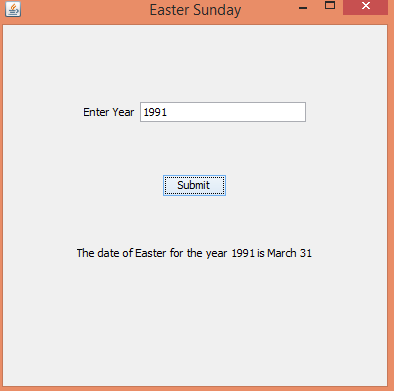
OUTPUT : 
Java Application for computing the date of Easter Sunday

Java Application for computing the date of Easter Sunday

Java Application for computing the date of Easter Sunday


Get the application  here (.jar file)


Related Programs :

Cpp Program to calculate the date of Easter Sunday 
C Program to Calculate Easter Sunday

Friday, 6 March 2015

Domain name to IP Address - Java GUI


This is a simple application developed in Java , this application takes the input as some domain name and resulting output will be its corresponding IP Address.

Here we use java swing and Abstract Window Toolkit(awt)  for the Graphical User Interface (GUI).

Here we will have a JLabel asking to enter some domain and a JTextField to enter the domain name.

JLabel url = new JLabel("Enter URL");
JTextField tfurl = new JTextField(20);

another label and textfield for showing its corresponding IP Address.

JLabel ipad = new JLabel("Corresponding Ip Address");
JTextField tfipad = new JTextField(20);


and 2 buttons Submit and Clear . The entered url's corresponding IP Address is calculated when Submit button is clicked and the textfields are cleared when Clear button is clicked.

JButton submit = new JButton("Submit");
JButton clear = new JButton("Clear");
now we will use a constructor , in that constructor we will set title for the frame , layout , and some panels to the layout

JPanel p, p1, p2, p3;

setTitle("Domain to Ip Address");
tfipad.setEditable(false);
setSize(400, 400);
setLayout(new GridLayout(5, 2));
error.setVisible(false);
p = new JPanel();
p1 = new JPanel();
p2 = new JPanel();
p3 = new JPanel();


p1.add(url);
p2.add(ipad);
p1.add(tfurl);
p2.add(tfipad);
p3.add(submit);
p3.add(clear);


add(p);
add(p1);
add(p2);
add(p3);


submit.addActionListener(this);
clear.addActionListener(this);

setDefaultCloseOperation(JFrame.EXIT_ON_CLOSE);


Now when submit button is clicked we will get the url entered and finds its corresponding IP Address by using InetAddress which is  present in  java.net package

String str = tfurl.getText();
InetAddress address = InetAddress.getByName(new URL(str).getHost());
String ip = address.getHostAddress();
tfipad.setText(ip);


Now when Clear button is pressed the data in both textfields tfurl and tfipad are removed,

tfipad.setText(" ");
tfurl.setText(" ");


Download the working application(jar file) here .

The Complete Code is here :

package domaintoip;

/**
*
* @author Avinash
*/
import java.awt.GridLayout;
import java.awt.event.ActionEvent;
import java.awt.event.ActionListener;
import java.net.InetAddress;
import java.net.MalformedURLException;
import java.net.URL;
import java.net.UnknownHostException;
import java.util.logging.Level;
import java.util.logging.Logger;
import javax.swing.*;

public class DomaintoIp extends JFrame implements ActionListener {

JLabel url = new JLabel("Enter URL");
JLabel ipad = new JLabel("Corresponding Ip Address");
JTextField tfurl = new JTextField(30);
JTextField tfipad = new JTextField(20);
JButton submit = new JButton("Submit");
JButton clear = new JButton("Clear");
JPanel p, p1, p2, p3;

public DomaintoIp() throws Exception {
setTitle("Domain to Ip Address");
tfipad.setEditable(false);
setSize(400, 400);
setLayout(new GridLayout(5, 2));

p = new JPanel();
p1 = new JPanel();
p2 = new JPanel();
p3 = new JPanel();

p1.add(url);
p2.add(ipad);
p1.add(tfurl);
p2.add(tfipad);
p3.add(submit);
p3.add(clear);

add(p);
add(p1);
add(p2);
add(p3);

submit.addActionListener(this);
clear.addActionListener(this);

setDefaultCloseOperation(JFrame.EXIT_ON_CLOSE);
}

public static void main(String[] args) {
try {
UIManager.setLookAndFeel(UIManager.getSystemLookAndFeelClassName());
} catch (Exception e) {

}
java.awt.EventQueue.invokeLater(new Runnable() {
public void run() {
try {
new DomaintoIp().setVisible(true);
} catch (Exception ex) {
Logger.getLogger(DomaintoIp.class.getName()).log(Level.SEVERE, null, ex);
}
}
});
}

@Override
public void actionPerformed(ActionEvent ae) {

try {
if (ae.getSource() == submit) {
String str = tfurl.getText();
InetAddress address = InetAddress.getByName(new URL(str).getHost());
String ip = address.getHostAddress();

tfipad.setText(ip);
}
if (ae.getSource() == clear) {
tfipad.setText(" ");
tfurl.setText(" ");
}
} catch (MalformedURLException | UnknownHostException e) {
}
}

}


Download the working application(jar file) here .


OUTPUT :

Domain name and its IP

Domain name and its IP

Domain name and its IP


Tuesday, 20 January 2015

Java Program to print a triangle with specific number


This is a Java Program to print a triangle filled with a specific number.


Java Program to print a triangle with a specific number


PROGRAM :
package codingcorner.in;

import java.util.Scanner;

public class TriangleWithNumbers {
public static void main(String[] ars) {
int i, j, n, k, num;
Scanner scan = new Scanner(System.in);
System.out.print("Enter number of lines[height of triangle] : \t");
n = scan.nextInt();
System.out.print("With which number do you want to fill the triangle : \t");
num = scan.nextInt();
scan.close();
for (i = 1; i <= n; i++) {
for (j = i; j < n; j++) {
System.out.print(" ");
}
for (k = 1; k < (i * 2); k++) {
System.out.print(num);
}
System.out.print("\n");
}
}
}


OUTPUT : 
Java Program to print a triangle with a specific number

Java Program to print a triangle filled with stars


This is a Java Program which  prints out a triangle filled with stars.

Java Program to print a triangle filled with stars

PROGRAM :
package codingcorner.in;

import java.util.Scanner;

public class TriangeWithStars {
public static void main(String[] args) {
int i, j, n, k;
Scanner scan = new Scanner(System.in);
System.out.print("Enter number of lines[height of triangle] : \t");
n = scan.nextInt();
scan.close();
for (i = 1; i <= n; i++) {
for (j = i; j < n; j++) {
System.out.print(" ");
}
for (k = 1; k < i * 2; k++) {
System.out.print("*");
}
System.out.print("\n");
}
}
}

OUTPUT :
Java Program to print a triangle filled with stars

Java Program to print a Right Angled Triangle.


This is a Java Program which prints out a Right Angled triangle.

Java Program to print a Right angled triangle

PROGRAM : 
package codingcorner.in;

import java.util.Scanner;

public class RightAngledTriangle {
public static void main(String[] args) {
int i, j, n, k;
Scanner scan = new Scanner(System.in);
System.out.print("Enter number of lines[height of triangle] : \t");
n = scan.nextInt();
scan.close();
for (i = 1; i <= n; i++) {
for (j = i; j < n; j++) {
System.out.print(" ");
}
for (k = 1; k < (i * 2); k++) {

System.out.print(k++);
}
System.out.print("\n");
}
}
}

OUTPUT : 
Java Program to print a Right angled triangle

Java Program to print Pascals triangle.


This is a simple Java Program which prints out a Pascals triangle with respect to the given input.

Java Program to print Pascals triangle


PROGRAM :
package codingcorner.in;

import java.util.Scanner;

public class PascalsTriangle {
public static void main(String[] args) {
int i, j, x, n, s;
Scanner scan = new Scanner(System.in);
System.out.print("Enter number of lines[height of triangle] : \t");
n = scan.nextInt();
scan.close();
for (i = 0; i < n; i++) {
x = 1;
for (s = 1; s <= n - i; s++)
System.out.print(" ");
for (j = 1; j <= i + 1; j++) {
System.out.print(" " + x);
x = x * (i - j + 1) / j;
}
System.out.print("\n");
}

}
}

OUTPUT : 
Java Program to print Pascals triangle

Java Program to print Palindrome triangle


This is a simple Java Program which prints out a Palindrome triangle with respect to the given input.

Java Program to print Palindrome triangle

PROGRAM :
package codingcorner.in;

import java.util.Scanner;

public class PalindromeTriangle {
public static void main(String[] args) {
int i, j, n;
Scanner scan = new Scanner(System.in);
System.out.print("Enter number of lines[height of triangle] : \t");
n = scan.nextInt();
scan.close();
for (i = 1; i <= n; i++) {
for (j = i; j < n; j++)
System.out.print(" ");
for (j = 1; j <= i; j++)
System.out.print(j);
for (j = i - 1; j >= 1; j--)
System.out.print(j);
System.out.print("\n");
}

}
}


OUTPUT : 
Java Program to print Palindrome triangle

Java Program to print Floyd's triangle


This is a simple Java Program which prints out the Floyd's triangle with respect to the input given.

Java Program to print Floyd's triangle


PROGRAM :
package codingcorner.in;

import java.util.Scanner;

public class FloydsTriangle {
public static void main(String[] args) {
int i, j, k = 1, n;
Scanner scan = new Scanner(System.in);
System.out.print("Enter the range: ");
n = scan.nextInt();
scan.close();
System.out.print("\nFLOYD'S TRIANGLE : \n");
for (i = 1; i <= n; i++) {
for (j = 1; j <= i; j++, k++) {
System.out.print(k + "\t");
}
System.out.print("\n");
}
}
}

OUTPUT :
Java Program to print Floyd's triangle

Java Program to print a diamond with stars pattern


This is a simple Java Program which prints out a diamond filled with stars with respect to the input given.

Java Program to print a diamond with stars


PROGRAM :
package codingcorner.in;

import java.util.Scanner;

public class DiamondWithStars {
public static void main(String[] args) {
int i, j, k, n;
Scanner scan = new Scanner(System.in);
System.out.print("Enter number of lines[height of diamond] : \t");
n = scan.nextInt();
scan.close();
for (i = 1; i <= n; i++) {
for (j = i; j < n; j++) {
System.out.print(" ");
}
for (k = 1; k < (i * 2); k++) {
System.out.print("*");
}
System.out.print("\n");
}
for (i = n - 1; i >= 1; i--) {
for (j = n; j > i; j--) {
System.out.print(" ");
}
for (k = 1; k < (i * 2); k++) {
System.out.print("*");
}
System.out.print("\n");
}
}
}

OUTPUT : 
Java Program to print a diamond with stars

Saturday, 17 January 2015

File Structures - Java Program to copy characters from one file to another file.


This is a simple Java Program copies characters from one  file to another file .

Here we use Reader and Writer classes FileReader and FileWriter for reading  and writing the characters respectively

PROGRAM :
package codingcorner.in;

import java.io.File;
import java.io.FileReader;
import java.io.FileWriter;
import java.io.IOException;

public class CopyingCharacters {
public static void main(String[] args) {
File inputFile = new File("input.txt");
File outputFile = new File("output.txt");
FileReader fr = null;
FileWriter fw = null;
try {
fr = new FileReader(inputFile);
fw = new FileWriter(outputFile);
int ch;
while ((ch = fr.read()) != -1)

fw.write(ch);
} catch (IOException e) {
System.out.println(e);
System.exit(-1);
} finally {
try {
fr.close();
fw.close();
} catch (IOException e) {
}
}
}
}

OUTPUT : 
First create a file input.txt in the projects root folder

Creating a new file input.txt
Now write some data into it,

Writing some data inti input.txt file

Now we run the program we just described above,
then check the location where we created input.txt , now we can see another output.txt created,

output.txt created after executing the program

Now open that output.txt file , we see the data copied from our first file input.txt to another file output.txt.

data copied from input.txt to this file output.txt

Friday, 16 January 2015

File Structures - Java Program to create a new file and write data to it.


This is a Java Program which creates a  new file and writes data to it.

Here we use FileOutputStream class and OutputStreamWriter classes to write the data into the file.

PROGRAMS :
package codingcorner.in;

import java.io.BufferedWriter;
import java.io.File;
import java.io.FileOutputStream;
import java.io.IOException;
import java.io.OutputStreamWriter;
import java.io.Writer;

public class FileOpeningWriting {
public void fileWriting() {
try {

File newFile = new File("sample.txt");
FileOutputStream is = new FileOutputStream(newFile);
OutputStreamWriter osw = new OutputStreamWriter(is);
Writer w = new BufferedWriter(osw);
w.write("Hello this is a sample file.");
w.close();
} catch (IOException e) {
System.err.println("Problem writing to the file");
}
}

public static void main(String[] args) {
FileOpeningWriting write = new FileOpeningWriting();
write.fileWriting();
}
}

OUTPUT :


Data Structures - Java Program to implement stack operations


In this post we will see some basic operations of stack like insertion , deletion . Generally a stack is a an abstract data type where insertion and deletion takes place at one end and that end is know as top.

Inserting an item to stack is called as PUSH operation.
Removing an item from a stack is called as POP operation.

Inserting or deleting an item takes place at one end and they are done one by one.

See the image below,
Data stack.svg
"Data stack" by User:Boivie - made in Inkscape, by myself User:Boivie. Based on Image:Stack-sv.png, originally uploaded to the Swedish Wikipedia in 2004 by sv:User:Shrimp. Licensed under Public Domain via Wikimedia Commons.

The principle of the stack is : Last In First Out (LIFO)
Here in this program we initially take top as -1 and when an element is inserted top is incremented and pushes the value in stack , similarly when when an element is deleted top is decremented and pops the value from stack.

There are two error conditions here :
  1. Stack Overflow
  2. Stack Underflow
Stack Overflow is a situation where the stack is full and we still trying to insert elements to that stack.
Stack Underflow is a situation where the stack is empty and we are still trying to delete  elements from that stack.

PROGRAM :
package codingcorner.in;

import java.util.Scanner;

public class StackOperations {
static final int MAX = 10;
static int top = -1;
static int stack[] = new int[MAX];

public static void main(String[] args) {
int element, choice, d;
Scanner scan = new Scanner(System.in);

while (true) {
System.out.print("\nSTACK OPERATIONS \n\n");
System.out.print("1.Insert \n");
System.out.print("2.Delete \n");
System.out.print("3.Display \n");
System.out.print("4.Exit\n\n");
System.out.print("Enter your choice. \t");
choice = scan.nextInt();

switch (choice) {
case 1:
if (top == MAX - 1)
System.out
.print("\nSTACK is already full. Delete some elements and try again ! \n ERROR : STACK OVERFLOW\n");
else {
System.out.print("\nEnter the value to insert.\t");
element = scan.nextInt();
push(element);
}
break;
case 2:
if (top == -1)
System.out
.print("\nSTACK is already empty. \n ERROR : STACK UNDERFLOW\n");
else {
element = pop();
System.out.println("Element removed from stack is "+ element);
}
break;
case 3:
if (top == -1)
System.out
.print("\nSTACK is empty. Cannot display anything\n");
else {
System.out.println("There are " + (top + 1)+ " elements in stack.");

for (d = top; d >= 0; d--)
System.out.println(stack[d]);
System.out.print("\n");
}
break;
case 4:
return;
}

}
}

private static int pop() {
int element;
if (top == -1)
return top;

element = stack[top];
top--;

return element;
}

private static void push(int value) {
top++;
stack[top] = value;

}
}

OUTPUT : 
Java - Stack Operations


Java - Stack Operations

Thursday, 15 January 2015

CPU Scheduling algorithm - SJF (Java)


This is a Java program which implements one of the CPU Scheduling algorithm called Shortest Job First(SJF).

Shortest Job First algorithm reduces the waiting time  but it is impossible to implement  as the processor must know all the jobs/processes  in advance.

PROGRAM :
package codingcorner.in;

import java.util.Scanner;

public class SJF {
public static void main(String[] args) {
int i, j, temp, temp2, n;
float avgWt, totalWt = 0;
int a[] = new int[10];
Scanner scan = new Scanner(System.in);

System.out.print("Enter how many jobs ?\t");
n = scan.nextInt();
int bt[] = new int[100];
int wt[] = new int[100];

wt[1] = 0;
for (i = 1; i <= n; i++) {
System.out.print("Enter burst time for job " + i);
bt[i] = scan.nextInt();
a[i] = i; // stores job has how much burst time in array i
}
scan.close();
for (i = 1; i <= n; i++)
// ascending order of burst times and a[i]

for (j = i; j <= n; j++)

if (bt[i] > bt[j]) {
temp = bt[i];
bt[i] = bt[j];
bt[j] = temp;
temp2 = a[i];
a[i] = a[j];
a[j] = temp2;
}

System.out.print("\nWaiting time for Job " + a[i] + " : 0 units \t");
for (i = 2; i <= n; i++) {
wt[i] = bt[i - 1] + wt[i - 1];
System.out.print("\nWaiting time for Job" + a[i] + ":\t" + wt[i]
+ " units \t");
totalWt = totalWt + wt[i];
}
System.out.print("\n\nThe total waiting time : " + totalWt);
avgWt = totalWt / n;
System.out.println("\n\nAverage waiting time : " + avgWt);
}
}

OUTPUT : 
Java - CPU Scheduling algorithm(SJF)


Wednesday, 14 January 2015

CPU Scheduling algorithm - FCFS (Java)


This is a Java program which implements one of the CPU Scheduling algorithm called First Come First Served(FCFS).

FCFS is the simplest scheduling algorithm , easy to understand and implement but not as efficient as remaining scheduling algorithms as its waiting time is high.

As the name suggests , here the processes/jobs are executed on first come first serve basis.

PROGRAM :
package codingcorner.in;

import java.util.Scanner;

public class FCFS {
public static void main(String[] args) {
int i,n;
float avgWt,totalWt=0;
Scanner scan = new Scanner(System.in);
System.out.print("Enter how many jobs ?\t");
n = scan.nextInt();
int bt[]= new int[n];
int wt[]= new int[n];
for(i=0;i<n;i++)
{
System.out.print("Enter burst time for job "+(i+1)+" :\t");
bt[i] = scan.nextInt();
}
scan.close();
System.out.print("\n\nWaiting time for Job 1 : 0 units\t");
wt[0]=0;
for(i=1;i<n;i++)
{
wt[i]=bt[i-1]+wt[i-1];
System.out.print("\nWaiting time for Job"+(i+1)+" : "+wt[i]+" units \t");
totalWt = totalWt + wt[i];
}
System.out.print("\n\nThe total waiting time : "+totalWt);
avgWt= totalWt/n;
System.out.println("\n\nAverage waiting time : "+avgWt);
}
}
NOTE : Assuming that all jobs arrive at the same time.

OUTPUT : 
Java - CPU Scheduling Algorithm(FCFS)

Monday, 12 January 2015

Java Program to find the lower triangular form for a given matrix

This is a Java program which display the lower triangular form of a given matrix.

To display the lower triangular form of a given matrix we make all the elements above the diagonal row as zero.

See the figure below,

PROGRAM :
package codingcorner.in;

import java.util.Scanner;

public class LowerTriangularMatrix {
public static void main(String[] args) {
int rows, columns, i, j;
Scanner scan = new Scanner(System.in);
System.out.print("Enter order of matrix : \t");
rows = scan.nextInt();
columns = scan.nextInt();
int matrix[][] = new int[rows][columns];
System.out.print("Enter elements of the matrix :\n");
for (i = 0; i < rows; i++) {
for (j = 0; j < columns; j++) {
System.out.print("Enter element m" + (i + 1) + (j + 1) + ":\t");
matrix[i][j] = scan.nextInt();
}
}
scan.close();
System.out.print("\n\nMATRIX is :\n");
for (i = 0; i < rows; i++) {
for (j = 0; j < columns; j++)
System.out.print(matrix[i][j] + "\t");

System.out.print("\n");
}

System.out.print("\n\nIts Lower Triangular form is: \n");
for (i = 0; i < rows; i++) {
for (j = 0; j < columns; j++) {
if (i >= j)
System.out.print(matrix[i][j] + "\t");
else
System.out.print(0 + "\t");
}
System.out.print("\n");
}
}
}

OUTPUT : 
Java - Lower Triangular Matrix

Java Pogram to find the upper triangular form for a given matrix.


This is a Java program which display the upper triangular form of a given matrix.

To display the upper triangular form of a given matrix we make all the elements below the diagonal row as zero.

See the figure below,


PROGRAM  : 
package codingcorner.in;

import java.util.Scanner;

public class UpperTriangularMatrix {
public static void main(String[] args) {
int rows, columns, i, j;
Scanner scan = new Scanner(System.in);
System.out.print("Enter order of matrix : \t");
rows = scan.nextInt();
columns = scan.nextInt();
int matrix[][] = new int[rows][columns];
System.out.print("Enter elements of the matrix :\n");
for (i = 0; i < rows; i++) {
for (j = 0; j < columns; j++) {
System.out.print("Enter element m" + (i + 1) + (j + 1) + ":\t");
matrix[i][j] = scan.nextInt();
}
}
scan.close();
System.out.print("\n\nMATRIX is :\n");
for (i = 0; i < rows; i++) {
for (j = 0; j < columns; j++)
System.out.print(matrix[i][j] + "\t");

System.out.print("\n");
}

System.out.print("\n\nIts Upper Triangular form is: \n");
for (i = 0; i < rows; i++) {
for (j = 0; j < columns; j++) {
if (i <= j)
System.out.print(matrix[i][j] + "\t");
else
System.out.print(0 + "\t");
}
System.out.print("\n");
}

}
}

OUTPUT : 
Java -  Upper Triangular Form

Java Program to find the transpose of a given matrix

This is a Java Program which prints the transpose of a given matrix.

Transpose of a matrix is obtained by interchanging the rows and columns of  a given matrix.

see the figure below,

PROGRAM :
package codingcorner.in;

import java.util.Scanner;

public class Transpose {
public static void main(String[] args) {
int rows, columns, i, j;
Scanner scan = new Scanner(System.in);
System.out.print("Enter order of matrix : \t");
rows = scan.nextInt();
columns = scan.nextInt();
int matrix[][] = new int[rows][columns];
System.out.print("Enter elements of the matrix :\n");
for (i = 0; i < rows; i++) {
for (j = 0; j < columns; j++) {
System.out.print("Enter element m" + (i + 1) + (j + 1) + ":\t");
matrix[i][j] = scan.nextInt();
}
}
scan.close();
System.out.print("\n\nMATRIX is :\n");
for (i = 0; i < rows; i++) {
for (j = 0; j < columns; j++)
System.out.print(matrix[i][j] + "\t");

System.out.print("\n");
}
System.out.print("\nIts TRANSPOSE is:\n");
for (j = 0; j < columns; j++) {
for (i = 0; i < rows; i++) {
System.out.print(matrix[i][j] + "\t");
}
System.out.print("\n");
}
}
}

OUTPUT : 

Java Program to calculate trace of a given matrix


This is a Java Program which calculates the trace of a matrix.

Generally trace of a square matrix is calculated as the sum of all the diagonal elements in a matrix.

PROGRAM : 
package codingcorner.in;

import java.util.Scanner;

public class Trace {
public static void main(String[] args) {
int rows, columns, i, j, trace = 0;
Scanner scan = new Scanner(System.in);
System.out.print("Enter order of matrix : \t");
rows = scan.nextInt();
columns = scan.nextInt();
int matrix[][] = new int[rows][columns];
System.out.print("Enter elements of the matrix :\n");
for (i = 0; i < rows; i++) {
for (j = 0; j < columns; j++) {
System.out.print("Enter element m" + (i + 1) + (j + 1) + ":\t");
matrix[i][j] = scan.nextInt();
}
}
scan.close();
System.out.print("\n\nMATRIX is :\n");
for (i = 0; i < rows; i++) {
for (j = 0; j < columns; j++)
System.out.print(matrix[i][j] + "\t");

System.out.print("\n");
}
System.out.print("\nIts TRACE is :\t");
for (i = 0; i < rows; i++) {
for (j = 0; j < columns; j++) {
if (i == j)
trace = trace + matrix[i][j];

}
}
System.out.print(trace);
}
}

OUTPUT :
Java - Trace of a matrix

Java Program to find the normal of a matrix


This is a Java Program which calculates the normal of a given matrix.

Generally normal of a matrix is calculated as the root of sum of squares of all the elements in a matrix.
PROGRAM :
package codingcorner.in;

import java.util.Scanner;

public class NormalMatrix {
public static void main(String[] args) {
double sum = 0;
int rows, columns, i, j;
double normal;
Scanner scan = new Scanner(System.in);
System.out.print("Enter order of matrix : \t");
rows = scan.nextInt();
columns = scan.nextInt();
int matrix[][] = new int[rows][columns];
System.out.print("Enter elements of the matrix :\n");
for (i = 0; i < rows; i++) {
for (j = 0; j < columns; j++) {
System.out.print("Enter element m" + (i + 1) + (j + 1) + ":\t");
matrix[i][j] = scan.nextInt();
}
}
scan.close();
System.out.print("\n\nMATRIX is :\n");
for (i = 0; i < rows; i++) {
for (j = 0; j < columns; j++)
System.out.print(matrix[i][j] + "\t");

System.out.print("\n");
}
System.out.print("\n\nIts NORMAL is:\n");
for (j = 0; j < columns; j++) {
for (i = 0; i < rows; i++)
sum = sum + Math.pow(matrix[i][j], 2);

}
normal = Math.sqrt(sum);
System.out.print(normal);
}
}

OUTPUT :
Java - Normal of a matrix

Saturday, 10 January 2015

Java Program to find the maximum difference between all the elements in an array

This is a Java Program which finds out the maximum difference between the elements in an array.

Here first we find the largest element in the array and store the result and then find the smallest element in the array and store the result .
Now substract the largest element with the smallest element , this gives us the maximum difference in an array.

PROGRAM :
package codingcorner.in;

import java.util.Scanner;

public class MaxDiffArray {
public static void main(String[] args) {
int i, n, l, s;
Scanner scan = new Scanner(System.in);
System.out.print("How many numbers? \t");
n = scan.nextInt();
int array[] = new int[n];
int dup[] = new int[n];
for (i = 0; i < n; i++) {
System.out.print("\nEnter number " + (i + 1) + " \t");
array[i] = scan.nextInt();
dup[i] = array[i]; // storing the copy of of array[]
}
scan.close();

for (i = 0; i < n; i++) // checking for largest
{
if (array[0] < array[i])
array[0] = array[i];
}
l = array[0]; // storing largest num
System.out.print("\n\nThe largest among the " + n + " numbers is "+ array[0]);

for (i = 0; i < n; i++) // checking for smallest
{
if (dup[0] > dup[i]) // we used duplicate because original array[] has changed
dup[0] = dup[i];
}
s = dup[0]; // storing smallest
System.out.print("\nThe smallest among the " + n + " numbers is "+ dup[0]);
System.out.print("\n\nThe maximum difference among numbers is "+ (l - s));
}
}

OUTPUT :
Java - Maximum difference between all the elements in an array